Yes, writing about SQL Server every 10 years will not bring me any medals. I know, I know.
Anyway, I am currently checking what is what on a new project and I got to see this in the header of a stored procedure from 10 years ago: “use @variable to suppress 'parameter sniffing‘”.
I will NOT dwelve here in the parameter sniffing topic, there are a ton of good resources out there already, but let’s have a little repro of the issue we are introducing by using variables inside stored procedures.
Before moving on, run the following in the AdventureWorks database:
CREATE NONCLUSTERED INDEX test
ON [Sales].SalesOrderHeader
INCLUDE ([TotalDue])
Now, let’s run some SELECT statements. Make sure you include the actual execution plan.
SELECT
CASE
WHEN SalesPersonID IS NULL THEN 'Internet Sales'
ELSE CAST(SalesPersonID AS VARCHAR(10))
END AS SalesPerson,
SUM(TotalDue) AS TotalSalesAmount
FROM
Sales.SalesOrderHeader
WHERE
SalesPersonID = 279
GROUP BY
CASE
WHEN SalesPersonID IS NULL THEN 'Internet Sales'
ELSE CAST(SalesPersonID AS VARCHAR(10))
END
ORDER BY
TotalSalesAmount DESC;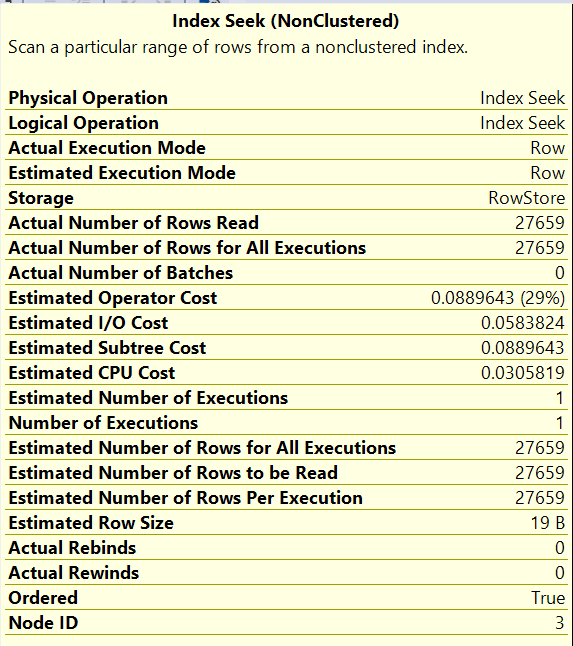
If you also applied the index, you will see that both estimated and actual number of rows are bang on.
Let’s repeat the experiment, but let’s declare a variable.
DECLARE @SalesPersonId INT = 279;
SELECT
CASE
WHEN SalesPersonID IS NULL THEN 'No Sales Person'
ELSE CAST(SalesPersonID AS VARCHAR(10))
END AS SalesPerson,
SUM(TotalDue) AS TotalSalesAmount
FROM
Sales.SalesOrderHeader
WHERE
SalesPersonID = @SalesPersonId OR (@SalesPersonId IS NULL AND SalesPersonID IS NULL)
GROUP BY
CASE
WHEN SalesPersonID IS NULL THEN 'No Sales Person'
ELSE CAST(SalesPersonID AS VARCHAR(10))
END
ORDER BY
TotalSalesAmount DESC;
Any changes in the execution plan? You bet – now, the actual and estimated number of rows are not quite there.
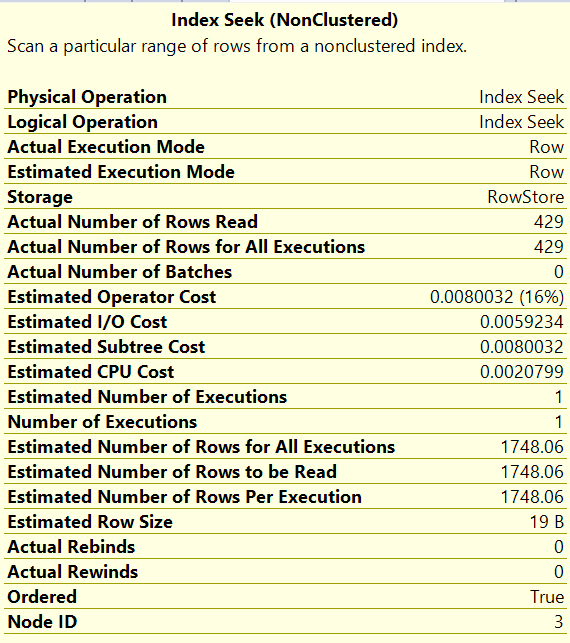
By now, the savy reader will know what happens when we put this inside a stored procedure:
CREATE PROCEDURE GetSalesBySalesPerson @SId INT = NULL -- Input parameter, defaults to NULL
AS
BEGIN
    -- SET NOCOUNT ON added to prevent extra result sets from
    -- interfering with SELECT statements.
    SET NOCOUNT ON;

    DECLARE @SalesPersonId INT = @SId; -- Assign the parameter to the variable

    SELECT CASE
               WHEN SalesPersonID IS NULL THEN
                   'No Sales Person'
               ELSE
                   CAST(SalesPersonID AS VARCHAR(10))
           END AS SalesPerson,
           SUM(TotalDue) AS TotalSalesAmount
    FROM Sales.SalesOrderHeader
    WHERE SalesPersonID = @SalesPersonId
          OR
          (
              @SalesPersonId IS NULL
              AND SalesPersonID IS NULL
          )
    GROUP BY CASE
                 WHEN SalesPersonID IS NULL THEN
                     'No Sales Person'
                 ELSE
                     CAST(SalesPersonID AS VARCHAR(10))
             END
    ORDER BY TotalSalesAmount DESC;
END;
GO
EXEC GetSalesBySalesPerson @SId = 279;
We just moved our issue inside a stored procedure, but nothing more.
Look, I am not saying there is no time or place for variables, but this is not it. Remember the comment from 10 years ago I found in the procedure header?
I cannot show you the code, but I can show you what happened after I removed the variables.


I will let you guess which is what.
List for you: variables, stored procedures, parameter sniffing, density vector.

 SQL-PLAY