Later edit: Both Uwe Ricken (https://www.linkedin.com/in/uwericken/, https://www.db-berater.de/) and Sascha Lorenz (https://www.linkedin.com/in/saschalorenz/) correctly pointed out that my little inconsisted writing was a tad too inconsistent – first of all, the title itself was NOT highlighting the very point of this blog post: unmatched indexes and how to deal with them by using dynamic SQL. Truth be told, nor was the content.
Thank you for reaching out and helping me in rethinking the idea.
First things first:
This blog post is NOT about how SQL uses estimates or density vector, it is simply about the idea of unmatched indexes (very few people seem to know about it, myself included) and playing with it.
A very quick (and most likely inconsistent writing) one, from a customer perf tuning investigation. Consider the following scenario:
A table with columns from Column1 to Column8.
Column1 is INT with IDENTITY property, Column8 is a BIT and we care about the 0 values, not the 1 (we are looking for customers who are not yet processed), Column2 and Column3 are NVARCHAR(MAX), while the rest of the columns are INT data types.
Yes, table autogenerated with ORM, I am so not going there…
Anyways:
DECLARE @Indexed BIT = 0;
SELECT column1,
       column2,
       column3,
       column4,
       column5,
       column6,
       column7
FROM [dbo].[Changes]
WHERE column8 = @Indexed;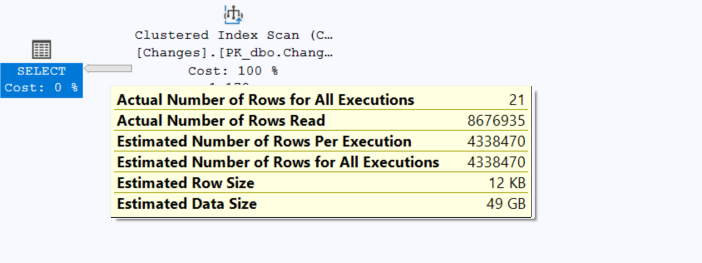
It is a known issue, I will not go into much detail, but NVARCHAR(MAX) is not your best bet for defining a data type to hold strings (if you are not familiar with the issues: https://sqlundercover.com/2025/06/30/why-not-just-use-varcharmax/).
How about the actual IO performed?
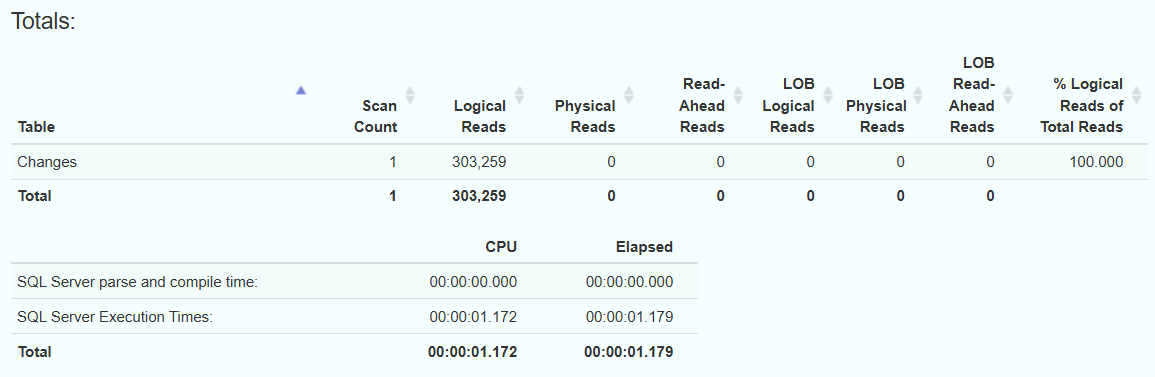
LE1: Also, by looking at the execution plan:
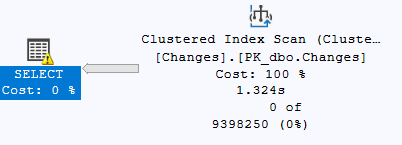
By hovering the mouse over the SELECT statement, no actual warning message was displayed, so we need to dig deeper into the XML plan:

End of LE1.
Enter unmatched indexes (https://www.brentozar.com/blitzcache/unmatched-indexes/).
LE2: I created a filtered index:
CREATE INDEX IX_Change_includes
ON dbo.Changes
(
column7,
column6,
column5,
column4
)
INCLUDE (column2, column3)
WHERE column8 = 0
End of LE2.
I will rewrite the SQL query to use dynamic SQL:
DECLARE @SQLString NVARCHAR(MAX);
DECLARE @ParamDefinition NVARCHAR(500);
DECLARE @Indexed BIT = 0;

SET @SQLString = N'
SELECT column1,
       column2,
       column3,
       column4,
       column5,
       column6,
       column7
FROM [dbo].[Changes]
WHERE column8 = @IndexedValue;';

SET @ParamDefinition = N'@IndexedValue BIT';

EXECUTE sp_executesql @SQLString,
                      @ParamDefinition,
                      @IndexedValue = @Indexed;
Yes, you can write dynamic SQL in many ways, I know that.
LE3: For this particular scenario (dynamic SQL with a filtered index), it did not seem to help.


Does not look like our index was selected. It only managed to paralelize the query, but nothing more.
End of LE3.
LE4: I moved the original index definition from the original post to this position, to reflect that initally the query was tested with a filtered index, and now we are testing with an index with included columns and no filter.
End of LE4.
Now let us define an index that should help us out:
CREATE INDEX IX_Change_includes
ON dbo.Changes
(
column8,
column7,
column6,
column5,
column4
)
INCLUDE (column2, column3)
We had to include columns 2 and 3 because they are NVARCHAR(MAX), so you cannot simply put them in the index definition.
Having said that, let us see the execution plan now, as well as the IO for the dynamic SQL with our index with included columns:
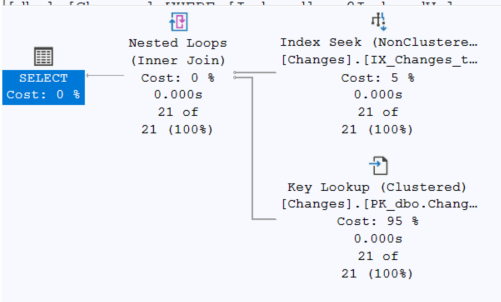

Absurdly fast compared to our regular SQL query.
LE5:
- please note that while the original post only highlighted one index (included columns, no filter). The expanded post also includes the test with a filtered index
- DBCC FREE PROCCACHE and DBCC DROPCLEANBUFFERS were run after every change introduced, which did not help in this particular scenario
- WITH RECOMPILE was not allowed in this particular scenario, nor stored procedures, so these scenarios have not been tested.
Again, thank you everyone who reached out to help me correct my initial post – indeed was way too confusing and did not reach its intended purpose.

 SQL-PLAY